


How to customise ChatGPT's personality
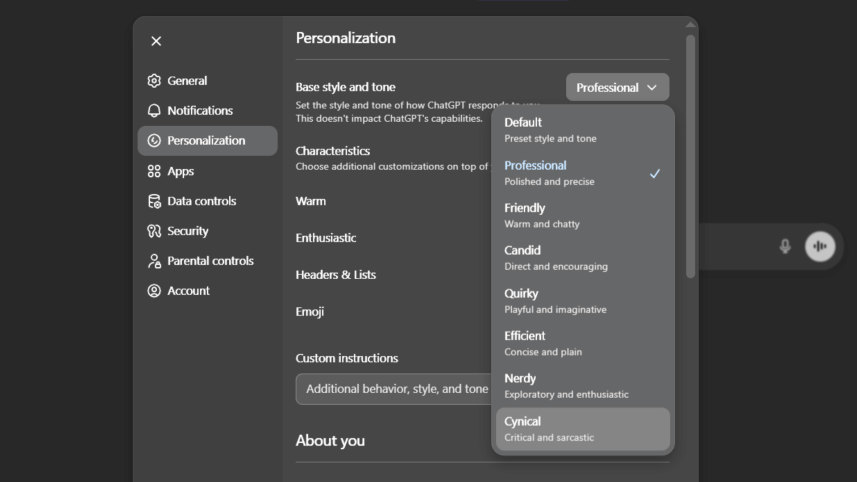
OpenAI has rolled out a new feature allowing users to customise the personality, or communication style, of ChatGPT. Here's how can you use the feature.
How to access the feature
Users can adjust the settings through the 'Personalization' menu.
 For all latest news, follow The Daily Star's Google News channel.
 - On the web: Select your profile icon in the bottom-right corner, choose 'Personalization', and use the drop-down menu next to 'Base style and tone'.
- On iOS & Android: Access 'Settings' via your profile icon, go to 'Personalization', and select your preference under 'Base Style and Tone'.
Personality options:
Users can select from seven predefined personality styles or a 'Default' neutral option. The available styles are:
- Professional: Uses formal language and polished phrasing.
- Friendly: Adopts a warm, conversational, and chatty tone.
- Candid: Provides direct, honest feedback with clear next steps.
- Quirky: Responds with a playful, humorous, and imaginative style.
- Efficient: Delivers concise, plain answers without extra words.
- Nerdy: Offers enthusiastic, exploratory, and detailed explanations.
- Cynical: Uses sarcastic and dry wit while providing practical answers.
According to OpenAI, the selected personality works alongside other user customisations like saved 'Memories' or 'Custom Instructions', though these may influence or override the chosen style. The update takes effect across all chats, including existing conversations, and is available on both web and mobile platforms.
The company states the change does not affect the AI's capabilities or safety rules but modifies the tone and style of its written responses
Comments